Everything in Monitor plus your choice of managed SOCKS5 gateway or WireGuard VPN with port forwarding—or use both together. Maximum flexibility for any torrent workflow.
Secure just your torrent client
8 GEOs with ports for seeding
Block leaks at source
Fast, knowledgeable help
Choose SOCKS5 for app-only protection, WireGuard VPN for full-PC coverage with port forwarding, or use both together for maximum flexibility.
Secure only your torrent client with managed proxy profiles. Perfect for split-tunneling workflows where you want other apps to use different connections.
Protect your entire PC with blazing-fast WireGuard VPN. Includes 8 dedicated IPs with pre-configured port forwarding—perfect for optimized seeding performance.
Use both SOCKS5 and WireGuard VPN together! Switch between them based on your needs, or run different clients through different gateways. All included in one plan.
Complete protection designed for serious torrent users who demand reliability, privacy, and peace of mind.
Lock your torrent IP with SOCKS5 or VPN. No accidental reveals when you switch networks—your identity stays protected 24/7.
Get 8 Locations with pre-configured listening ports. Maximize your seeding performance and improve your ratios on private trackers.
Smart shielding rules detect and block IP leaks before they expose you. Combined with realtime monitoring, you get defense-in-depth protection.
Three simple steps to complete torrent protection
Select SOCKS5 for app-only protection or WireGuard VPN for full-PC coverage with port forwarding. Create profiles with auto-generated credentials.
Use our Auto Setup tool or manual ready-to-copy configuration snippets for your torrent client. Enable leak-blocking rules to prevent exposure at the source.
Realtime alerts watch for leaks continuously. If drift occurs, rules block exposure instantly and notify you via email or webhook.
The TorSentinel Proxy Config app scans for your torrent clients and injects the correct SOCKS5 settings automatically — no manual editing required.

Scans your system for qBittorrent, µTorrent, BitTorrent, Vuze and more. Every detected client displays its config path and protection status.
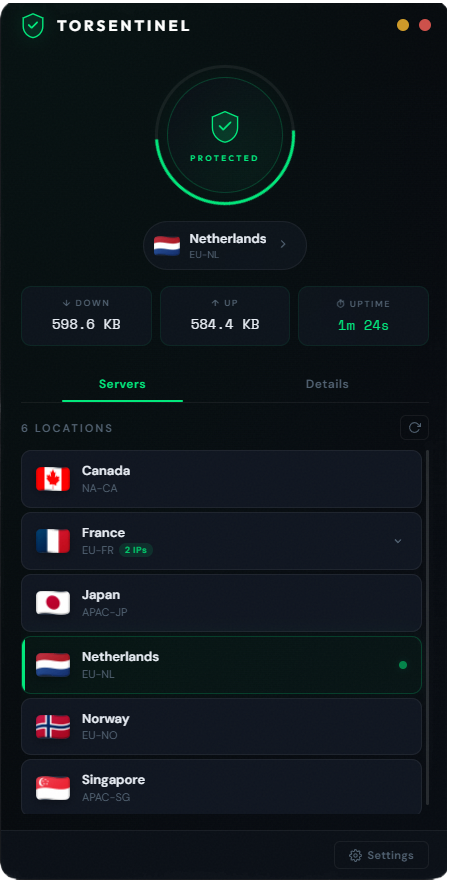
The TorSentinel VPN app connects your entire system through WireGuard across 8 global locations, each with pre-configured forwarded ports — essential for seeders.
One tap connects your entire machine. The animated status ring turns green the moment WireGuard is up — your real IP is hidden, your forwarded port is live, and you're ready to seed at full speed.

All active · Pre-forwarded ports · Zero logs
Ready-to-use configuration snippets for popular clients
Connection → Proxy Server
Type: SOCKS5
Host: proxy.torsentinel.net
Port: 1080
Authentication: ✓
Username: <profile-username>
Password: ••••••••

Optional Security:
✓ Use proxy for peer connections
✓ Use proxy for hostname lookups
✓ Disable connections not supported by proxy[Interface]
PrivateKey = <your-private-key>
Address = 10.66.1.2/32
DNS = 1.1.1.1
[Peer]
PublicKey = <server-public-key>
Endpoint = wg.torsentinel.net:51820
AllowedIPs = 0.0.0.0/0
PersistentKeepalive = 25
# Port Forward: 42156 ready to use{
"proxy-auth-enabled": true,
"proxy-enabled": true,
"proxy": "proxy.torsentinel.net",
"proxy-port": 1080,
"proxy-username": "<profile-username>",
"proxy-password": "<profile-password>",
"proxy-type": 2
}When using WireGuard VPN, all 5 Locations have pre-configured listening ports. Simply add the port number to your torrent client:
Compatible with qBittorrent, Transmission, Deluge, rTorrent, uTorrent, Tixati and more
Everything in Monitor, plus both SOCKS5 and WireGuard VPN options, shielding rules, unlimited clients, and priority support. Complete protection for serious users.
Everything you need to know about Armor
It depends on your needs! Use SOCKS5 if you want to protect only your torrent client while leaving other apps unaffected—great for split-tunneling with an existing VPN. Choose WireGuard VPN if you need port forwarding for optimal seeding performance or want full-device protection. You can even use both together for maximum flexibility.
Port forwarding allows other peers to initiate connections directly to you, significantly increasing the number of peers you can seed to. This is essential for maintaining good ratios on private trackers and helps the overall health of torrent swarms. Each of the WireGuard Locations comes with a unique pre-configured listening ports ready to use.
Armor includes everything in Monitor (realtime IP leak detection and alerts) and adds both a managed SOCKS5 gateway and WireGuard VPN with port forwarding, leak-shielding rules that block exposure at the source, support for unlimited torrent clients, and priority expert support.
Any client that supports SOCKS5 proxy configuration works with our gateway. For VPN, any client works since it protects your entire system. We provide ready-to-use configuration snippets for the most popular clients including qBittorrent, Transmission, Deluge, rTorrent, uTorrent, BitTorrent, and Tixati.
No. TorSentinel follows a strict no-logs philosophy. We focus exclusively on leak detection and prevention—not monitoring your torrenting activity. Neither the SOCKS5 gateway nor WireGuard VPN log your traffic, and our monitoring only checks for IP leaks, not content.
Yes! The SOCKS5 gateway is specifically designed to work alongside existing VPNs—it tunnels only your torrent traffic through our gateway while your other apps use your regular VPN. This layered approach provides additional security. If you use our WireGuard VPN option, you can switch between it and your existing VPN based on your needs.
Armor provides realtime monitoring with alerts delivered within seconds of detecting a potential IP leak. Shielding rules work proactively to block leaks before they occur, and if any drift is detected, you'll receive instant notifications via email or webhook.
Yes! Armor includes all the alert capabilities of Monitor, including custom webhook integration. You can send leak alerts to Discord, Slack, your own API endpoints, or any webhook-compatible service. Perfect for automation and incident response workflows.
Join thousands of users who trust Armor to keep their torrent identity secure, private, and consistent—with the flexibility to choose SOCKS5, VPN, or both.
